Motion, on demand
Describe it and it appears — animated, polished, endlessly tweakable. The hard part of motion design just got easy.
Prompt a motion graphic — a lower third, a logo sting, kinetic titles, an animated chart. Renderkiln turns it into broadcast-ready video with a real transparent background, ready for your edit, deck, feed, or site. No screen recording. No cloud. No After Effects.
Drag in the artifact. Out comes finished, usable media.
Out of the kiln — every frame on time.
Renderkiln takes an animation that only plays inside a web browser and turns it into a real, high-quality video file — ready to use anywhere: a see-through overlay for an editor, a clip for a feed, a loop for a site. It does the one job most people don’t realize is possible, perfectly.
Claude Design generates animated lower thirds, logo reveals, kinetic type, and live charts from a sentence — on-brand and instantly restyleable. The catch: it lives as a webpage, with no real way out.
Describe it and it appears — animated, polished, endlessly tweakable. The hard part of motion design just got easy.
Gorgeous on screen, and stuck there. No export button, no clip you can drop into a project.
Screen-recording throws away the very thing that made it worth making: clean gradients, smooth motion, transparency.
Renderkiln is the bridge from that artifact to finished, usable media. See what you can make →
One prompt becomes media you can use at any stage — the edit, the deck, the feed, the site, the ad.
Name strips and titles with a real transparent background — they sit over footage, no green screen.
Silky 60 fps captions and word-by-word reveals that hold the scroll. Vertical, square, or wide.
Branded intros and outros that float over your video, ready to drop between scenes.
Numbers that count up and bars that grow — finished clips for a deck or explainer.
Crisp hero loops and UI motion, as a clean MP4 or a transparent clip.
Restyle the text and colors, then batch out a dozen sized, on-brand versions.
You don’t need to know or care what’s under the hood. Renderkiln understands the common ways motion gets made and knows how to capture each in pristine, professional quality. You bring the animation; it handles the rest.
Flawless, pro-grade, dead-simple, and private. The trick is refusing to trade any one of them for another.
A real transparent background — ProRes 4444 with true alpha, plus a luma matte. Lower thirds and stings land over footage with zero keying — an actual layer, not a video on a baked-in background.
“It’s not a video. It’s a layer.”
Every frame is rendered right on your machine, and none of your content is ever uploaded. For brand and agency teams sitting on unreleased work under NDA, that means it stays unreleased — and the tool clears legal review.
“Processed on your Mac, never uploaded.”
Renderkiln draws each frame deliberately and keeps it only once it’s perfect: buttery motion, clean color, the same file every time. Nothing is sampled in real time, so nothing stutters, drifts, or smears.
“Render every frame on purpose.”
Recolor, rewrite the text, hide a stray element, swap a background — with a live preview. Localize, personalize, or spin a whole set of on-brand variations from one artifact.
“Fix it before you render it.”
True temporal motion blur — the filmic shutter that makes motion feel shot, not stepped. The kind of finish only an engine that owns the clock can produce.
“Real blur, real alpha, real ProRes.”
Renderkiln isn’t a feature bolted onto something bigger. It’s a single-purpose tool, made with a care you can feel in ten seconds — worth seeing even if you never need it yourself.
Instead of racing the clock in real time, it takes control of it — drawing every frame deliberately and keeping each only once it’s perfect. The hard way, because it’s the only flawless one.
The other ways out are placeless — an upload box, a terminal, a capture bar. Renderkiln is a warm, dark workshop where rendering is a firing: the room heats as it works, and out comes a numbered, cooling object.
It shows the file size before you commit, shows exactly what will render, and never leaves a broken clip behind. You trust it with the big render because it tells you what it doesn’t know.
That point of view runs all the way through. Finished renders land on a Cooling Rack, numbered and cooling from amber to ceramic — “Firing nº 412,” a maker’s mark in one serif. Hold ⌥ and Render becomes Test fire. The Dock icon glows hotter as the render climbs. Features copy in a sprint; a point of view doesn’t.
Not a mockup — the actual app. Feed it on the left, watch it in the middle, fire it at the bottom right.
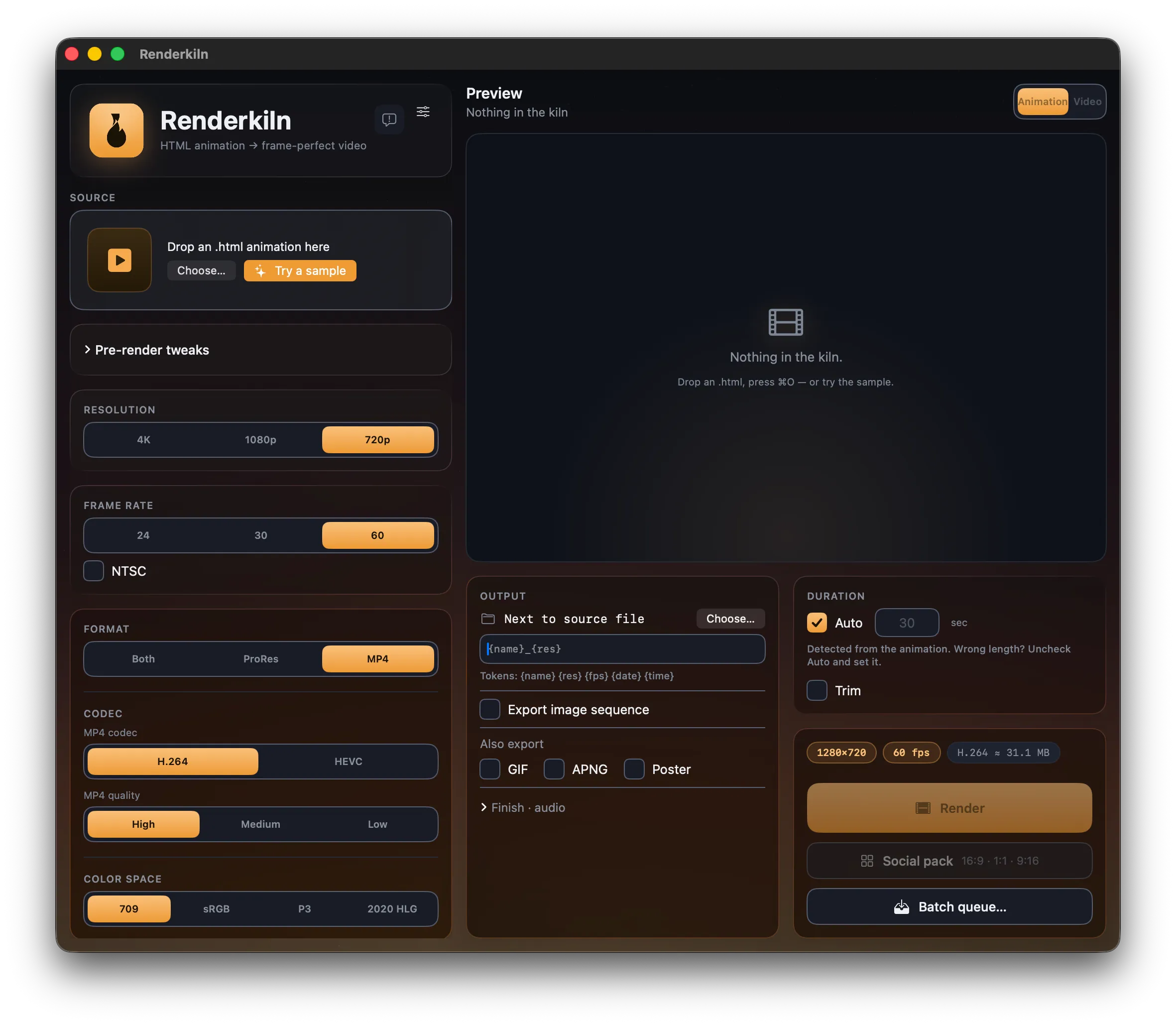
Quality, privacy, or your afternoon. Renderkiln is the one that asks for none of it.
Captures in real time — drops frames under load, and can’t do transparency.
They upload your work and return a watermarked, low-fps MP4.
Frame-perfect — if you wrangle Node, Chromium, and ffmpeg.
Flawless, private, pro-grade. You just drag and drop.
The one with no catch| What you want | Screen rec. | Cloud | Scripts | Renderkiln |
|---|---|---|---|---|
| Flawless / identical every time | ||||
| Real transparent background (alpha) | ~ | |||
| ProRes 422 / 4444 for editors | ~ | |||
| Processed on your device | ||||
| No technical setup | ||||
| Restyle before you render |
ProRes 422 family, 4444, H.264, HEVC — with a size estimate before you commit.
A real transparent background, or a tiny luma matte for Fill + Matte.
Every frame as PNG or TIFF — the clean way into After Effects.
16:9, 1:1, and 9:16 in one click.
Broadcast-ready ProRes 4444 with alpha, straight from a prompt. Drop it on the timeline — no keying, no rebuild.
Prompt it, render it, post it. Silky 60 fps motion text that holds the scroll — no After Effects.
Spin on-brand variations in minutes, and keep unreleased client work on your own machine.
Renderkiln is in private beta on macOS. Fire your first AI motion graphic into real video — and help shape the v1.0 release.
macOS · TestFlight beta · Processed on your Mac · no account, no cloud server.